There are many types of communication barriers, including language, literacy and visual challenges. Overcoming these challenges and providing a more inclusive experience requires a multi-faceted approach. The use of visual communication is one tool used in product design to help achieve this goal. In today’s guest blog post from Colleen Furlong of Allegion she explores this topic in depth.
~~~
 How Visual Communication Helps Make Door Hardware More Inclusive and Intuitive
Inclusive design focuses on breaking down barriers to deliver solutions that are usable and intuitive to more people; it starts with challenging assumptions. When it comes to communication, text-based communication is commonly used, but this approach can overlook important user considerations, such as native language, reading proficiency and visual acuity.
Use of visual communication is one way to overcome these challenges and aims to convey important information in a way that is more efficient and easier to understand. The important question then becomes, what means of visual communication best conveys the desired information in a way that is universally recognized and understood? The answer takes careful consideration, research and extensive usability testing to refine and optimize.
Ana Sofia Esquivel, Allegion industrial designer shares, “When designing solutions, such as visual indicators, the industrial design team considers both usability and accessibility standards to improve the user experience, with key focuses on distance visibility and color vision deficiency (CVD or color blindness). As a result, our indicators are not red and green; they are red and white because those with CVD are often unable to differentiate between red and green. We also conducted research to understand how large or small the text on the solutions needed to be. By designing with usability and accessibility principles in mind, we are able to set new standards for an elevated user experience.”
Navigating Codes
A common application where visual indicators are used is in emergency lockdown. Current building code does not require the use of visual indicators. However, code does dictate requirements that all lockdown solutions, including those with visual indicators, must satisfy.
Lori Greene, Allegion manager of codes and standards, highlights some important codes to know related to emergency lockdown, “From an accessibility standpoint, lockdown solutions must satisfy the American’s with Disabilities Act (ADA) and it’s requirements that releasing hardware must be operable without tight grasping, pinching, or twisting of the wrist, and must allow egress without the use of a key, tool, special knowledge or effort.
Fire and life safety is another important aspect to consider. Life Safety Code (NFPA 101) requires in most jurisdictions, one motion must unlatch the door for egress, although recent editions of NFPA 101 allow a second nonsimultaneous releasing motion for classroom doors in existing schools. It also dictates that releasing hardware must be mounted between 34 inches and 48 inches above the floor.
Finally, it is important to stay up to date on the latest code updates related to lockdown included in the 2027 edition of the International Building Code (IBC). Beginning with the 2027 edition, classrooms, offices, and other occupied rooms in the applicable use groups in schools, day care centers, colleges and universities will be required to be lockable from inside the room.
The new code will also include locking requirements for exterior entry doors in these facilities. Exterior doors must be lockable from the egress side of the door – opening the door to lock or unlock the outside trim will not comply. This section will also require at least one door on each building face to be able to be unlocked from the outside with a key or other approved means.”
One common mistake we see related to lockdown, is that in an effort to enhance security, life safety may inadvertently be sacrificed. This is the case with many barricade devices that restrict free egress. They are often perceived as a cost-effective retrofit solution, however many of these products can violate life safety code requirements.
Therefore, it is important that when evaluating lockdown solutions, including those with visual indicators, you do so with an understanding of all applicable codes.
Solutions for Visual Indication
In high stress situations, clarity and confidence matter. Lockdown solutions with visual indicators provide information in a quick and intuitive manner through the use of symbols, words and color coding.
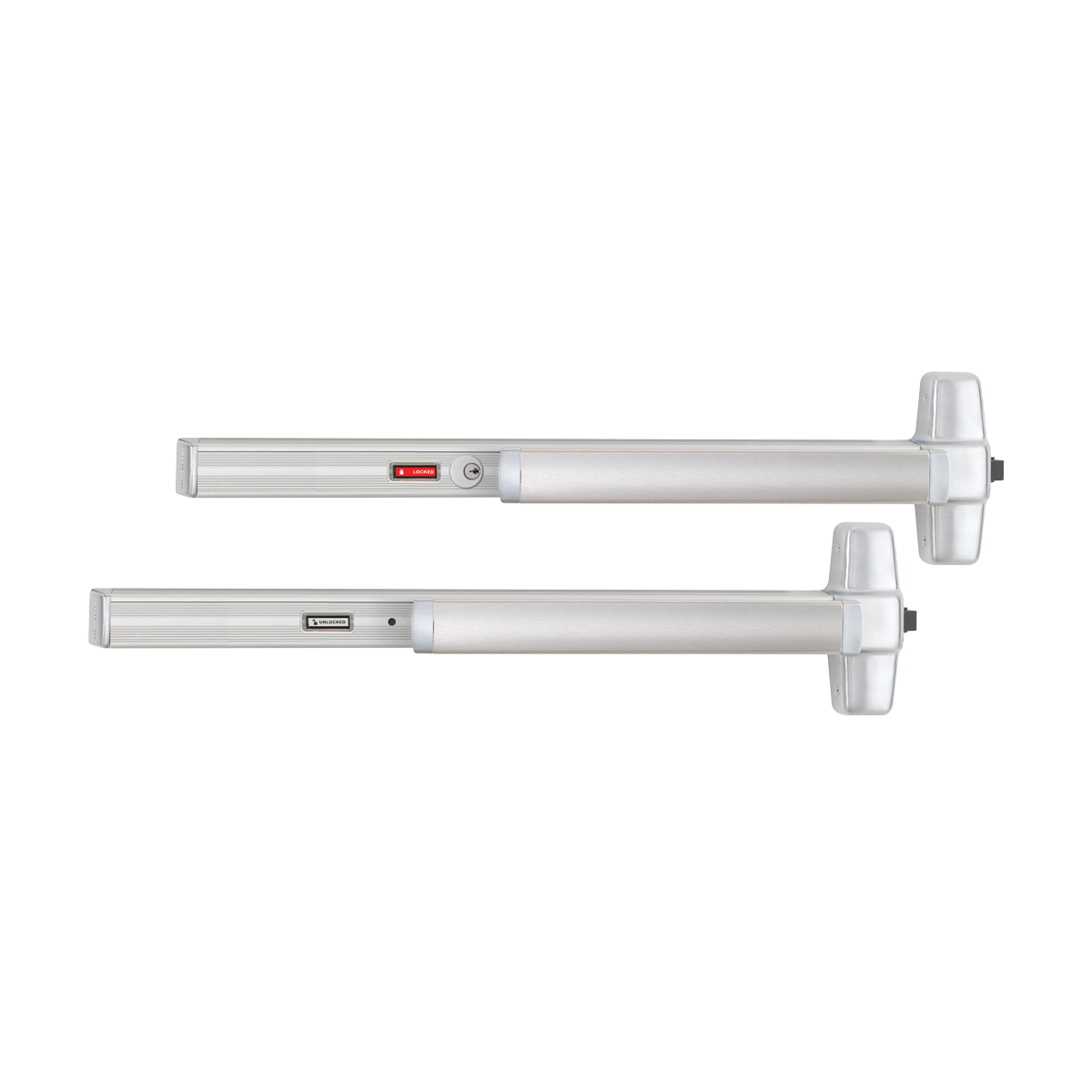 Von Duprin Panic Hardware with Visual Indicators
Von Duprin status indicators aid lockdown procedures by providing visual verification of the status of the lever trim or dogging mechanism. They are visible at a distance so that the status can be assessed without having to approach the door. They feature icons that accompany the words to make determining the status of the device quick and intuitive.
The indicators are also color coded, displaying red when they are “LOCKED” and white when they are “UNLOCKED”. These colors are purposefully used to account for color vision deficiency.
In the case of the cylinder & hex dogging security indicator (CDSI/HDSI) the indicator refers to the status of the dogging mechanism and displays “LOCKED” when the dogging mechanism is undogged and “UNLOCKED” when the dogging mechanism is dogged, as well as the corresponding symbols.
In addition, where a key cylinder or thumb turn is in use, Von Duprin directional indicators aid the user in determining which way the key or thumb turn must be rotated to secure the opening by using easily understood arrow symbols. This makes operation in emergency situations efficient.
Together, these features allow the user to remain on the secure side of the door while quickly determining the status of the device from a distance, easily change the status of the device from the interior side, and maintain free egress.
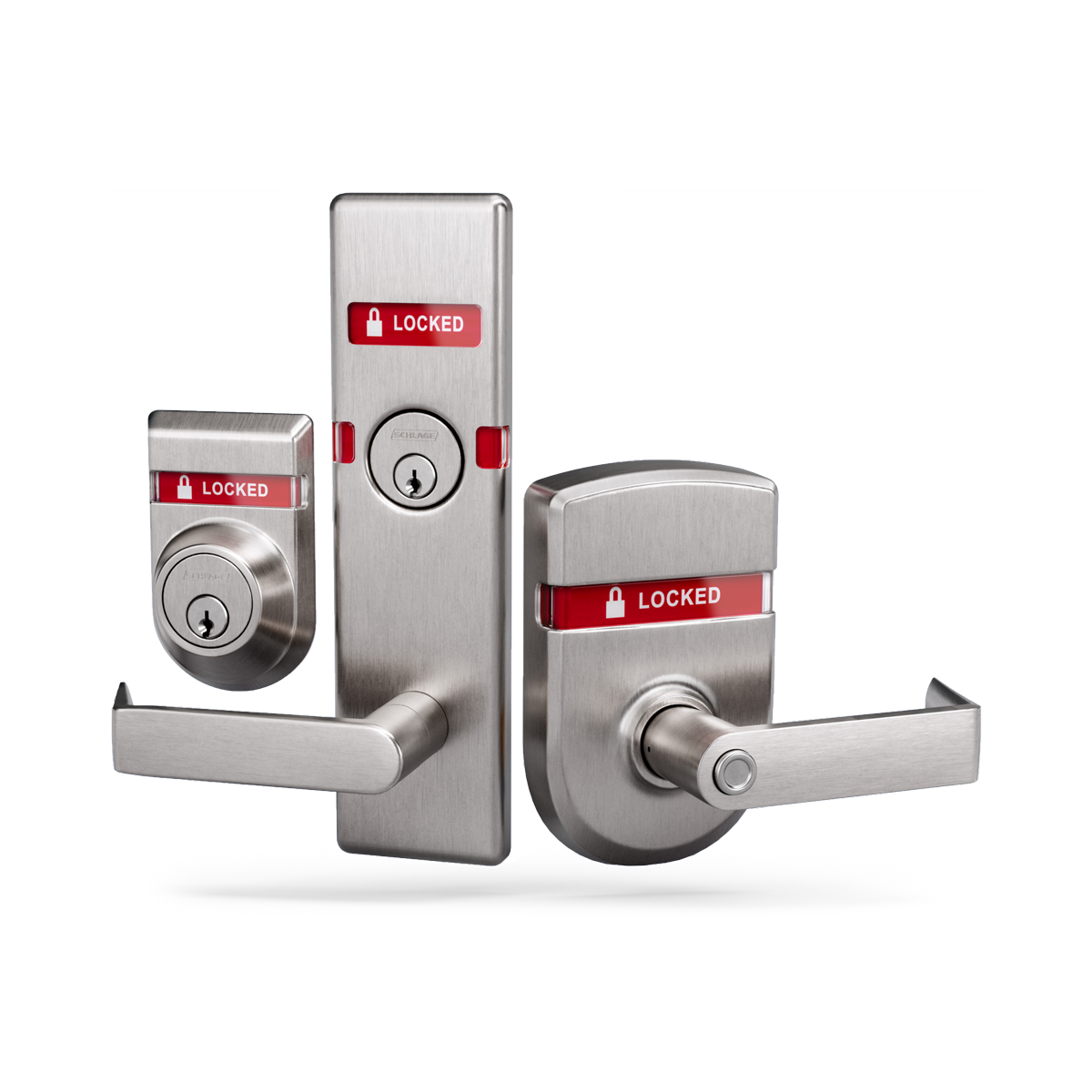 Schlage Locks with Visual Indicators
For many years Schlage L Series mortise locks have offered lock status visual indication trims. These include options for multiple languages as well as symbol characters depicted as a closed padlock or an open padlock to describe a locked or unlocked state. More recently, Schlage has introduced a broader array of indication trims on cylindrical ND Series locks and B series deadbolts as well as an expanded offering for L Series. These award-winning solutions all feature a combination of red “LOCKED” and white “UNLOCKED” color cues as standard to ensure individuals with color vision deficiency can readily see and understand the status of the lock. Within the marketplace, the Schlage indication trims offer some of the largest, 180-degree visibility windows available allowing users to see status from a distance and at nearly any angle. The ND Series window is notably large, and like the L and B Series, contains both symbols and words. All are designed to provide peace of mind whether the application is for classroom lockdown or privacy.
Breaking Down Communication Barriers
Use of accessible design principles can help make solutions more intuitive and inclusive, promoting wider usability. In emergency lockdown situations, wider usability should be one of many goals to strive for. Utilizing visual communication is one tool designers use in support of this goal. As you evaluate solutions, this broader understanding of inclusive design, code requirements and available product features provides helpful context in the decision-making process.
Learn more about Allegion’s recommended best practices for the safety and security of openings, doors and hardware in K-12 settings.

You need to login or register to bookmark/favorite this content.





Am I correct in saying that if the device is equipped with electric trim release or latch retraction, the status indicator will follow?
Hi Jim –
As far as I know the indicators are only available for mechanical dogging and mechanical lever trim, except for the ESL option: https://idighardware.com/2021/04/product-update-von-duprin-emergency-secure-lockdown-esl/. With the ESL, the indicator does change state when the device is undogged using the thumbturn. If you have a specific product/function question, I can confirm with Product Support.
– Lori